Turn your PC into an Apple TV AirPlay Receiver
Mirror your iPhone or iPad screen to Windows 10/11 or Arch Linux in crisp 1440p / 1080p @ 60 FPS with zero perceptible latency. No apps on iOS, no cables, completely private on your local Wi-Fi.
Clean, Native Blue & White Interface
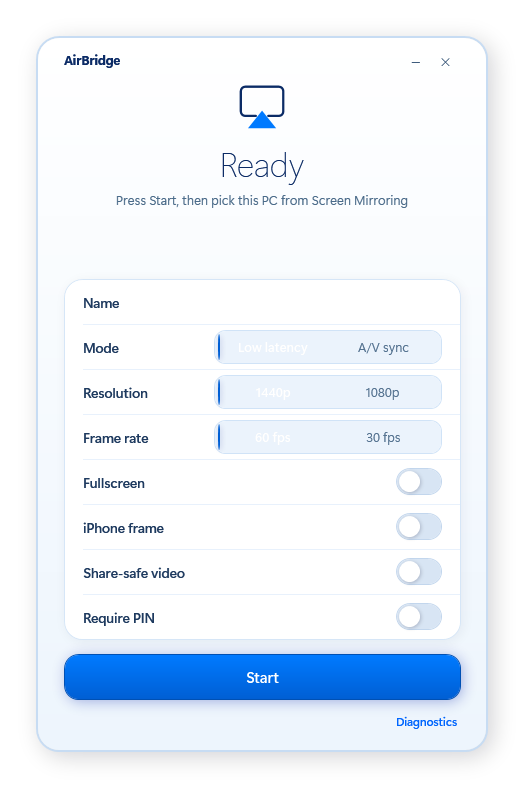
Engineered with a minimalist Apple-inspired control dashboard. Tune resolution, latency modes, frame rates, and phone chassis overlay in real-time.
Adaptive Latency Modes
Toggle between Low latency for gaming/screen interaction or A/V sync for flawless video playback.
1440p & 1080p @ 60 FPS
Hardware accelerated with D3D11 video sink and WASAPI audio sink for crisp, smooth 60 frames-per-second streaming.
Framed Mirroring Overlay
Wrap your mirroring stream in a sleek, realistic iPhone chassis with dynamic aspect-ratio auto-rotation.
Security & PIN Protection
Optional PIN code verification prevents unauthorized connection attempts from guests on your network.
How AirBridge Works
From zero to full 60 FPS screen mirroring in under 10 seconds. No cables, no iOS apps, and completely free.
Launch AirBridge on your PC
Double-click AirBridge.exe. The application automatically starts the local Bonjour discovery service and configures low-latency ports. No complex installation or accounts required.
Engineered For Performance & Simplicity
Everything you need for seamless AirPlay mirroring on your Windows or Arch Linux PC without bloated commercial software.
Ultra Low-Latency Mirroring
Powered by Direct3D 11 hardware video pipelines and WASAPI audio sinks. Sub-50ms latency makes screen interaction, presentations, and gaming smooth and responsive.
100% Native iOS Experience
Uses the native AirPlay Screen Mirroring built into iOS and iPadOS. No third-party apps to install on your phone, no profiles, and zero sideloading required.
1440p & 1080p @ 60 FPS
Stream at silky-smooth 60 frames per second with high-definition rendering. Automatically scales to match your PC monitor resolution with zero stutter.
Completely Private & Local
All video and audio streams travel strictly across your local Wi-Fi network. No telemetry, no external cloud servers, and zero data leaves your room.
Phone-Shaped Chassis Frame
Choose between borderless immersion, full-screen display, or a sleek iPhone bezel frame with rounded corners that rotates smoothly with your phone.
Built-In Diagnostics Doctor
Includes an intelligent healthcheck script that verifies your Apple Bonjour responder, checks firewall rules, and identifies network adapter conflicts automatically.
First-Class Arch Linux & AUR Port
Full native UxPlay 1.73 engine integration with GTK 4 interface, systemd user service, and automatic pacman dependency resolution.
Frequently Asked Questions
Have questions about how AirBridge works? We have answers.